What Is a Client Portal, & What Does One Cost?
Client portals explained: what they do, when a business needs one, the factors that affect scope and cost, and buy-vs-build guidance.
A client portal is a secure, logged-in area where each customer sees their own files, orders, bookings or invoices, instead of chasing you by email. Code23 builds these to a fixed price agreed up front, with a Discovery Sprint credited against the build if you go ahead. Portal costs vary by scope. Configuring an existing SaaS product is usually the least expensive route; custom authentication, permissions, documents, payments and multi-organisation integrations increase cost. Code23 provides a fixed price after discovery, with hosting, licences and ongoing care quoted separately.
What a client portal is (definition block) and the problems it solves
What is a client portal?
A client portal is a secure, account-based website (or app) where each client sees their own information and actions - files, orders, bookings, tickets, statements - instead of chasing updates over email or shared drives.
It solves three recurring pains:
- Inbox archaeology. Self-service access can reduce “Can you resend the latest proposal?” requests.
- Fewer status calls. A visible job timeline can reduce “where are we?” calls.
- Handoff risk. Documents, approvals and payments can live in one place with an audit trail when the portal records the relevant events, not in someone’s Sent folder.
Portals sit next to SaaS products in shape - auth, roles, admin - but the commercial job is usually serving your existing clients, not acquiring strangers. Cost context for the wider product family: SaaS development cost UK. Hub: SaaS platforms.
What should a client portal include?
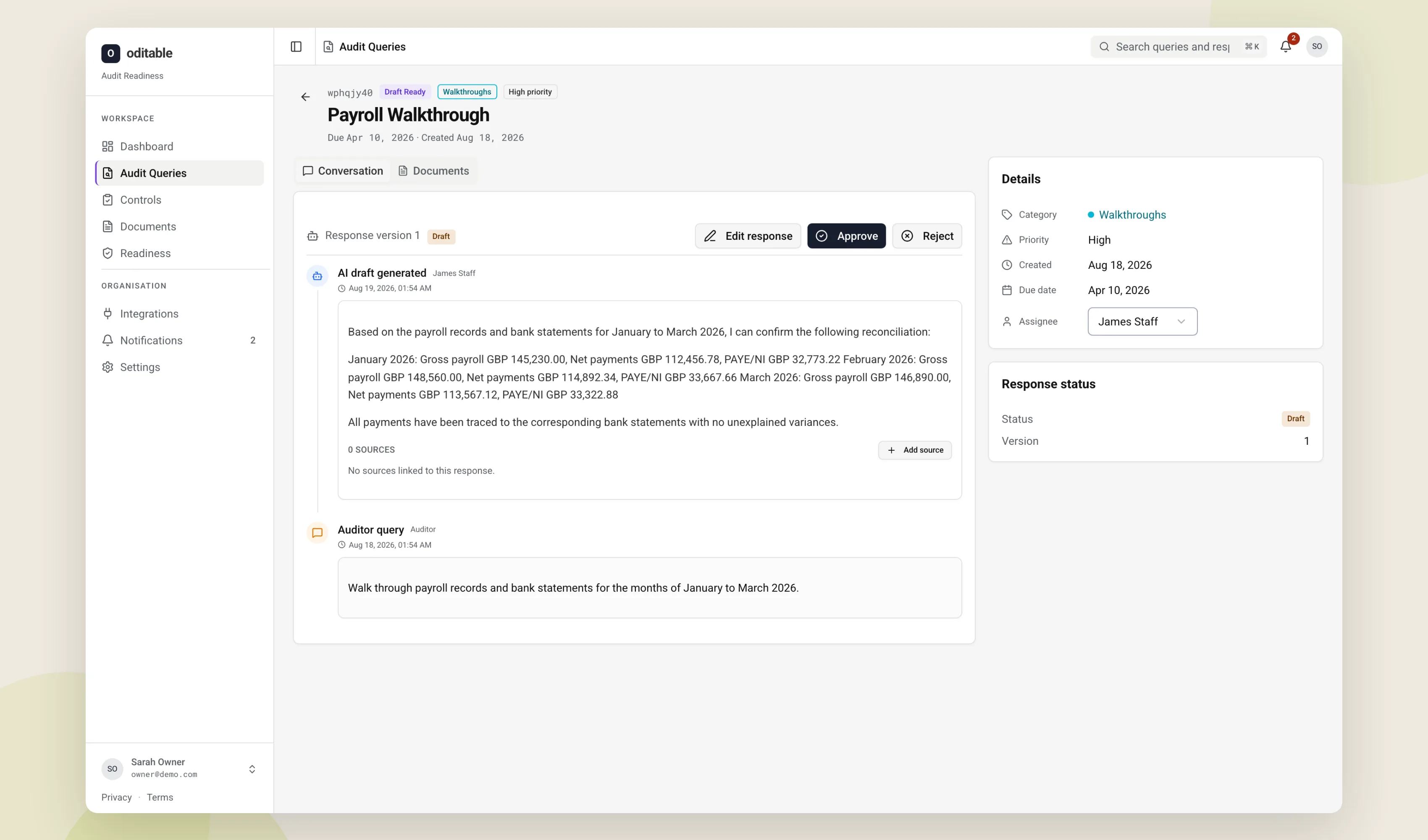
A serious portal should include reliable login, role-aware views, the documents or records clients actually need, clear status, and an admin path so your team can help without a developer - messaging and payments only when they remove a real email or invoice loop.
Off-the-shelf vs custom: when SaaS portals stop fitting
Can I build a client portal without custom development?
Yes - many teams start on HubSpot, SharePoint, clienteling tools, or vertical SaaS portals when their workflow matches the product. Custom development becomes rational when permissions, branding, document rules or integrations refuse to fit without brittle workarounds.
Stay on SaaS when:
- One or two roles, standard file sharing, light branding is enough
- You will accept their data model and export limits
Configure it when:
- Your process nearly matches the vendor’s happy path
Go custom when:
- Clients, staff and partners need different objects and permissions
- Documents have retention, watermarking or approval rules the SaaS cannot express
- Payments, job systems or CRMs must sync both ways without Zapier spaghetti
- White-label or multi-brand experiences matter commercially
Buy-vs-build is not ideology. It is whether the template fights your margin. Timeline siblings for lean custom cuts: MVP build time. Mobile-heavy variants sit nearer app development cost UK.
What a custom portal costs in the UK
How much does it cost to build a client portal?
Portal costs vary by scope. Configuring an existing SaaS product is usually the least expensive route; custom authentication, permissions, documents, payments and multi-organisation integrations increase cost. Code23 provides a fixed price after discovery, with hosting, licences and ongoing care quoted separately. Anything outside the agreed scope is priced separately before we do it; ongoing ops can sit on Support & Growth when you want eyes on uptime after launch.
Timeline orientation: Code23 confirms a schedule after discovery; integrations, payments, document workflows, ownership and review time can extend it. AI-assisted development can speed up scaffolding and basic screens; permission design and document policy still need a person’s judgement.
"Code23 undertook a large redevelopment project for us, including the rollout of over 100 individually branded websites. The overarching goals of the project were to improve: 1. Our Flexibility & Control 2. Customer Experience 3. Transparency Around Pricing All of which were delivered to an excellent standard, especially the new custom quote builder, which is industry leading!"
The features that matter: auth, documents, payments, messaging, admin
Five surfaces often determine whether the portal reduces work or creates a second inbox.
Auth. Authentication may use passwords, magic links, SSO or invitation flows depending on the audience, threat model and account lifecycle. Password reset and session hygiene are boring and non-negotiable.
Documents. Versioning, permissions, preview, and retention beat a dump of PDFs. If legal needs an audit of who downloaded what, say so up front.
Payments. Invoices, card capture, or both. Agree refund rules across finance and product before implementing portal payments.
Messaging. Threaded messages with attachments help; a chat toy that nobody monitors hurts. Prefer routes your team already staffs.
Admin. Impersonation-with-audit, password resets, document overrides, and job status edits. Appropriate admin tools can reduce developer intervention for these exceptions.
Skip vanity dashboards until the five above work on mobile. Make the core workflows usable on mobile.
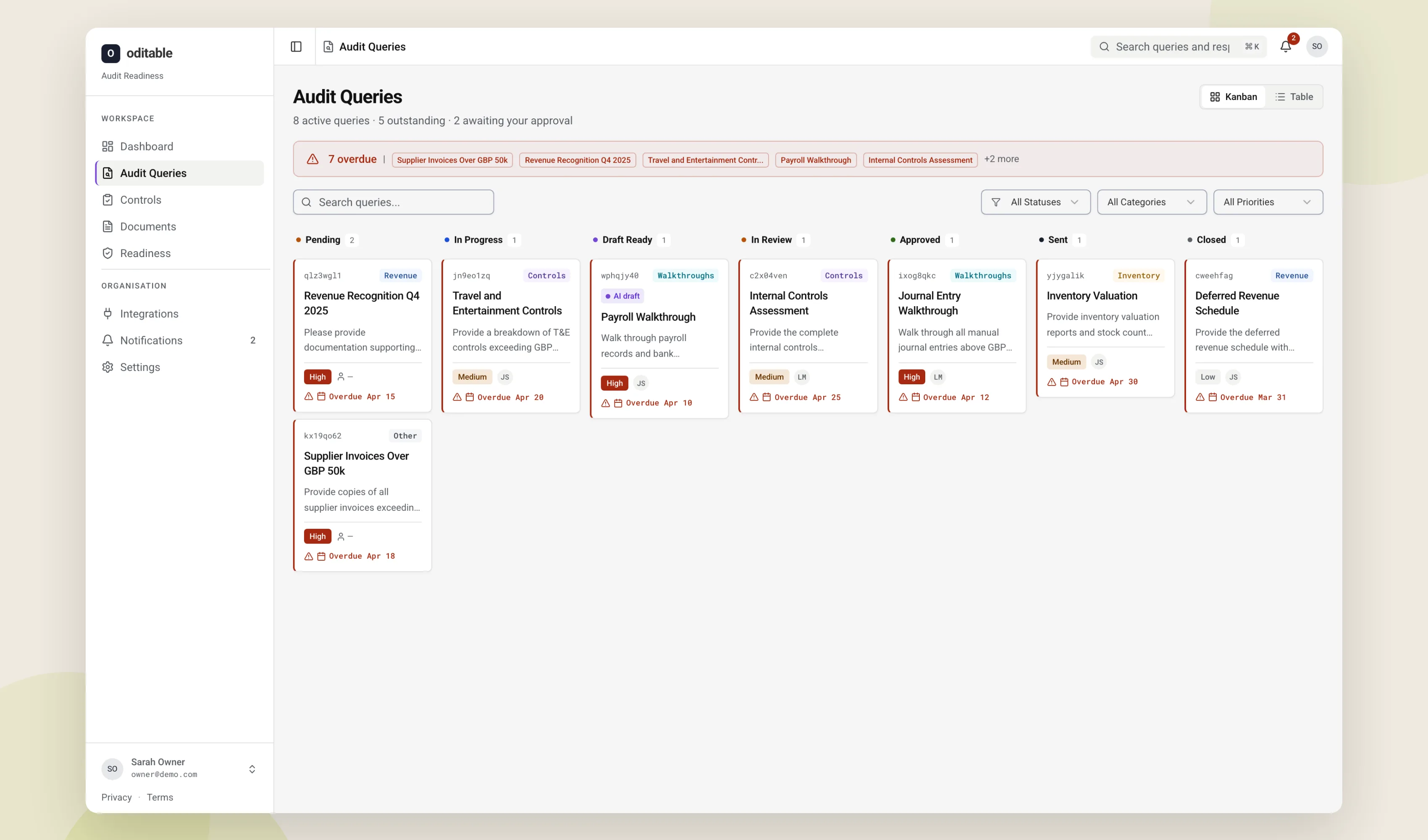
A portal build in practice
In our experience a typical portal project looks like this: map out what clients actually need to do (download, approve, pay, ask), design the login and the minimum set of records behind it, build the logged-in screens with senior developers directing AI where it speeds things up, harden permissions and file handling, then launch with a small pilot group before rolling out to every account. Across 350+ projects since 2005, we’ve learned that mirroring an internal CRM can create a poor client experience when its language and actions do not match client needs. Clients need their own language and their next action, not your ops chrome.
Worked pattern (composite from portal-shaped builds, not a named client case study): a services firm drowning in “please resend” emails ships document access + invoice status first; messaging lands second; fancy analytics wait until the inbox volume drops. Delivering document access and invoice status first can provide value earlier than launching a larger portal all at once.
Frequently asked questions
What actually drives the cost of a client portal?
The feature list matters, but roles, permissions, rules and integrations often drive the complexity underneath it. The real cost drivers are how many different types of user see different things, whether documents carry approval or retention rules, whether payments run through the portal, and how many other systems it has to sync with. Two portals that look identical in a demo can sit in very different price bands once you look underneath.
Do I need a custom-built portal, or will an off-the-shelf tool do?
Usually SaaS is fine when one or two roles need standard file sharing and light branding, and your process already matches the vendor’s happy path. Custom development earns its cost once permissions, document rules or integrations start fighting the template. If you’re not sure which camp you’re in, our Discovery Sprint will tell you straight which one fits before you commit to either.
Are there ongoing costs after a client portal is built?
Yes. Hosting, licences and any monitoring or maintenance sit on top of the build price, whichever shape of portal you choose. Code23 can provide ongoing monitoring and maintenance through Support & Growth once the portal is live, so there’s a named team keeping an eye on uptime, backups and security rather than finding out something’s broken from a client’s email.
How long does a client portal take to build?
Timelines often depend on integrations and workflow complexity as well as headline feature count. Code23 confirms a schedule after discovery; integrations, payments, document workflows, ownership and review time can extend it. Payments, document workflows or several external systems to sync with are what stretch a timeline, not the number of screens.
Next step
If you’re weighing up a client portal, don’t start by picking a tech stack. Start by mapping what your clients actually need to do: which files, which approvals, which payments, and who else needs to see it.
Our Discovery Sprint does exactly that. We map your client jobs, the roles involved and the objects behind them, tell you straight whether a SaaS tool will do the job or you need something custom, then hand you one fixed price for the build, credited in full against it if you go ahead. We’ve delivered 350+ projects since 2005.
Get cost certainty
Get a fixed price before the build starts.
We’ll discuss what you need, then get back to you with a clear price and timescale within 48 hours.


