Is WordPress Good for a Marketplace? Not Any More
Is WordPress good for a marketplace? Not any more. Why we no longer recommend it, what to fix now, the better alternatives and how to move without losing SEO.
Is WordPress good for a marketplace? Not any more. Code23 has built marketplaces on WordPress and WooCommerce for years, and we no longer recommend it for a new one. A WordPress marketplace depends on a stack of plugins that nobody owns as a whole, plugins account for 91% of newly reported WordPress vulnerabilities, and its data was built for posts and products rather than sellers, bookings and payouts. If you already run one, fix what’s broken now to protect your revenue, then plan a controlled move to Sharetribe, Mercur, MarketStarter or a custom build before a security problem or a growth ceiling forces it.
In August we switched code23.com off WordPress.
I’ve built on WordPress for more than 20 years. It paid for a big part of Code23’s history, we’ve built a lot of marketplaces on it, and we still host and look after plenty of WordPress sites that businesses rely on every day. So it wasn’t a small decision.
But if you’ve got a marketplace on WordPress, you need a plan to move off it. Not this week, maybe not this year. But a plan.
I’ve lost work for saying that. Earlier this month a marketplace owner chose another developer because they felt we were more interested in replacing their WordPress build than looking after it. I understand why. I’d still give them the same advice.
Marketplaces show the cracks faster than any other kind of site. Once independent sellers manage their own stock, buyers are searching supply that changes by the hour, money is split between three parties and someone on your team is sorting out disputes, you’re not running a website any more. You’re running a software product with at least three front doors: one for buyers, one for sellers and one for your own team.
That doesn’t mean switching yours off tomorrow. Most owners I speak to can’t, and shouldn’t. It means knowing which of your problems can be fixed and which are the platform telling you it’s done.
Contents
- Why WordPress marketplaces get so complicated
- Which WordPress marketplace problems can you fix?
- How do you know your marketplace has outgrown WordPress?
- Is WordPress secure enough for a marketplace?
- What does an agent-ready marketplace look like?
- What should you move a WordPress marketplace to?
- How to migrate a WordPress marketplace
- Should you fix or migrate your WordPress marketplace?
- Frequently asked questions
Why WordPress marketplaces get so complicated
WordPress started life as a blogging platform. WooCommerce turned it into a capable shop. Then a marketplace plugin such as Dokan, WCFM Marketplace, MultiVendorX or WC Vendors adds sellers, dashboards, commissions and withdrawals on top.
For years that was the quick, affordable way to prove an idea, and it’s how a lot of the marketplaces we’ve built started out. It’s also where things start to overlap.
A typical WooCommerce marketplace ends up relying on separate plugins for seller sign-up, listings, search, commissions, payouts, refunds, messages, reviews, caching and backups. Feed them in one at a time and watch what happens.
Each plugin does its own job. The marketplace is what happens between them, and nobody owns that part.
A WordPress update works fine with WooCommerce but breaks the marketplace extension. The payment plugin records the order, but the seller dashboard never finds out. A caching rule speeds up your listings and quietly breaks someone’s account page. It looks modular in the proposal. In production it behaves like one tightly knotted system.
Plugins aren’t the villain here. We’ve used them for years. The risk is how many separate release cycles you’re depending on, the quality of the custom code holding them together, and whether anyone has ever tested the whole marketplace, end to end, as one product.
Which WordPress marketplace problems can you fix?
Before I’d recommend a rebuild, I look for problems with how the site is run and built rather than what it’s built on. A lot of those can be fixed where they are.
Nobody owns the whole platform
One owner I spoke to recently had already put a lot of money into WordPress, so replacing it straight away wasn’t realistic. The more urgent problem was simpler: parts of the site kept breaking, and nobody was on hand to fix them when it mattered.
That’s an ownership problem before it’s a technology problem.
The first job is to work out who controls the domain, DNS, Cloudflare, hosting, WordPress itself, the payment gateway, email, backups and any third-party feeds. An alert nobody reads isn’t monitoring. A backup nobody has ever restored isn’t a recovery plan.
This is where our WordPress support and maintenance comes in. We take on the hosting, backups, monitoring and fixes, so there’s one team answerable when something breaks. That gives the business a dependable base, and it gives you the evidence to decide what really needs rebuilding.
"…did an excellent job in re-designing and re-building our marketplace website. This was a very complex job with separate shops/payments/blog/categories and everything was custom coded… Code23 has also provided our hosting and on-going support, back ups, online security and maintenance."
It’s never been properly performance-tuned
I won’t tell you WooCommerce can’t scale. It can handle big catalogues, and the WooCommerce team is putting serious work into performance. Its performance-at-scale roadmap covers High-Performance Order Storage, lighter admin screens and more edge caching.
That roadmap also shows how much work is involved. An established marketplace might need HPOS compatibility checks, database query profiling, object caching, image processing, background jobs, CDN rules and a proper load test. Moving to a bigger server without finding the bottleneck just moves the same problem somewhere more expensive.
Buyers see copy before they see stock
In one marketplace review we did recently, the site had tens of thousands of listing URLs. But the category pages we sampled read more like a directory than a shop. Buyers scrolled past paragraphs of copy before they saw a single listing, and the filters, result counts and sorting weren’t doing much to help anyone narrow down a real choice.
That can usually be fixed without replacing anything. Category pages can lead with live stock. Filters can match how buyers in your niche actually shop. Seller data can be cleaned up before it ever reaches search.

Marketplace SEO is much more than meta titles. Categories, locations, listings, seller profiles and filters make up the structure Google crawls, and our marketplace SEO guide explains why some filter combinations deserve to be indexed while empty or near-duplicate ones don’t. Google makes the same point in its guidance on faceted navigation: left unchecked, filter combinations can create an almost endless number of URLs.
Nobody has cleaned up the plugin list
A plugin count isn’t a diagnosis. Ten bad plugins can do more damage than forty well-maintained ones. When I review a WordPress marketplace, I’m looking at:
- Whether two plugins are doing the same job
- Which extensions are abandoned or unsupported
- Which ones write to the same order, user or listing data
- Whether custom code works around WooCommerce’s documented APIs
- Which pages can’t be cached, and why
- Whether every update is tested against buyer, seller and admin journeys before it goes live
Clearing out an obsolete extension or replacing one brittle integration can buy a marketplace useful time. If you can’t justify a rebuild yet, that’s a sensible call. Just treat it as runway, not the finish line.
How do you know your marketplace has outgrown WordPress?
The case for moving gets stronger when every new feature needs a workaround for the same underlying problem.
Your business doesn’t fit products and orders
A product marketplace, a services marketplace, a rental platform and a lead-generation directory all work differently underneath.
A services marketplace might need availability, territories, qualifications, packages, deposits and rescheduling. A rental marketplace needs assets, collection windows, damage deposits and utilisation. A B2B marketplace needs companies, approval chains, quotes, purchase orders and account credit.

You can model most of that in WordPress. We’ve done it. The question is whether all those custom fields, post types and bits of user and order data stay understandable, enforceable and fast.
When your business rules are spread across hooks, code snippets, plugin settings and a spreadsheet someone keeps on their desktop, nobody has one reliable picture of the marketplace any more. That’s the warning sign.
Search has become a product in its own right
Marketplace search has to understand stock, location, availability, price, quality and sometimes what the buyer really means. It might need to rank an approved seller above a half-finished profile, hide anything that’s unavailable and show why a result matches.
WordPress can plug into Algolia, Typesense, Elasticsearch and the rest. We’ve built those integrations. But if every index update has to piece together inconsistent data from several plugins, a better search engine just shows the mess underneath more clearly.
Our guide to faceted search in marketplaces covers what buyers need from search. The migration question is whether your data can deliver it reliably.

Your sellers are stuck in a generic dashboard
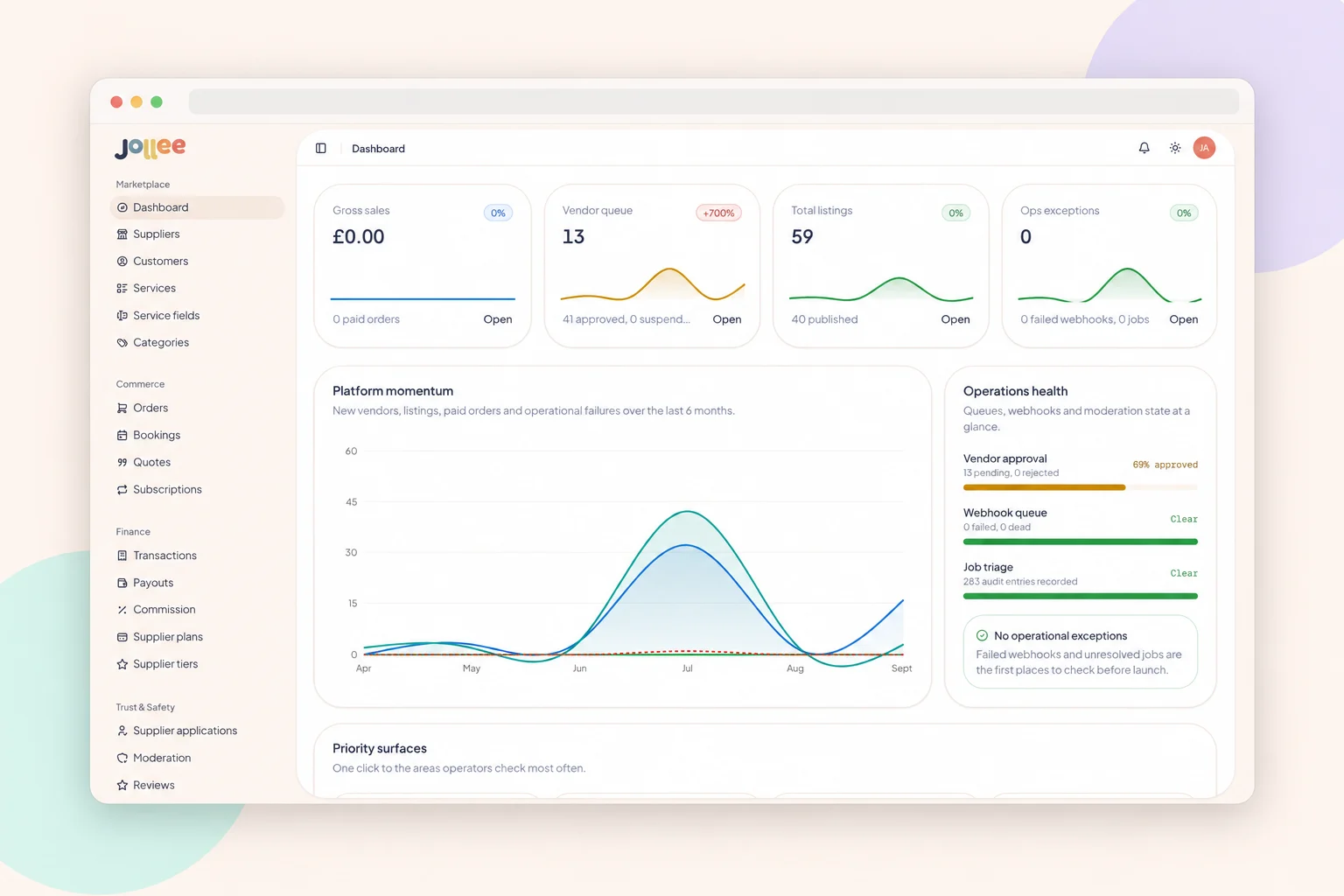
Seller tools should fit the job sellers actually do: importing stock, getting verified, managing availability, replying to enquiries, issuing refunds, uploading evidence or checking when they’ll be paid.
Generic multi-vendor dashboards are fine when your process is generic. They get expensive when your team spends its days making up for missing features with support tickets, spreadsheets and WhatsApp messages.
Your own team’s tools matter just as much. They should be able to see why a listing is blocked, pause a payout, trace a dispute, moderate a review and see the history behind a decision, without asking a developer to go digging in the database.
Payments have outgrown a checkout plugin
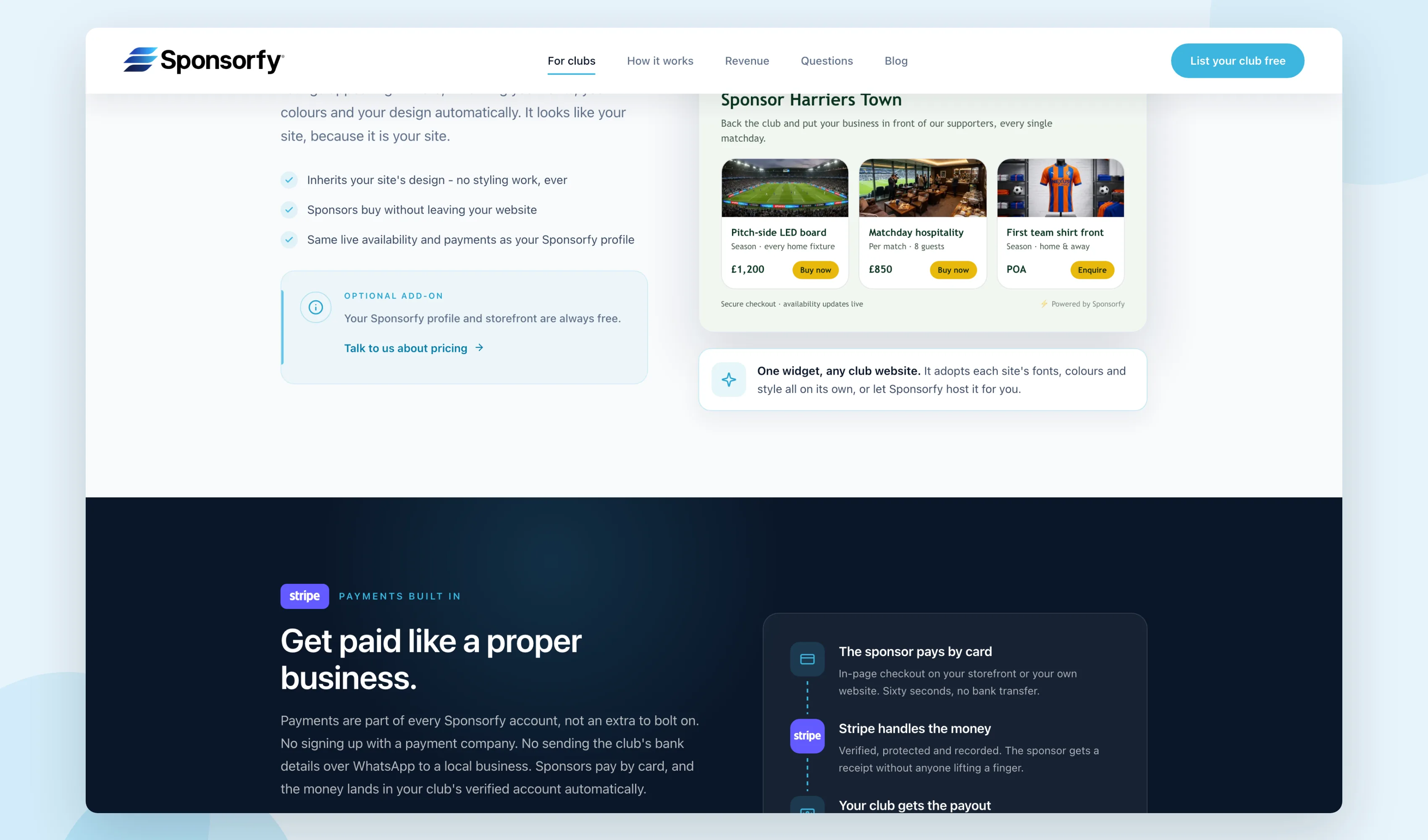
Taking a card payment is the easy bit. A marketplace might also need seller onboarding, identity checks, split payments, delayed transfers, platform fees, refunds, chargebacks, negative balances, tax details and payout reconciliation.
Stripe Connect is built for exactly this, but your platform still has to record what should happen to the money and why. The payment status has to agree with the order, the seller and your own ledger.
If your finance person can’t reconcile a payout without stitching together WordPress orders, plugin logs and a Stripe export, payments have become a core part of the platform rather than a plugin setting.
Your roadmap is mostly workarounds
This is usually the clearest sign of all.
If every feature conversation starts with “the plugin doesn’t quite do that”, “we can’t change that screen” or “we’ll need another extension”, you’re paying a platform tax on every idea you want to try.
That’s the point to compare the cost of another year of workarounds with the cost of owning a cleaner foundation. It’s the same decision founders face when they outgrow a hosted builder, which is why our Sharetribe vs custom marketplace guide is worth a read here too.
Each feature costs more than the last, and the platform gets harder to change.
Budget goes on: holding it togetherThe foundation fits the business, so new features stop fighting it.
Budget goes on: what makes you differentIs WordPress secure enough for a marketplace?
We host more than 60 WordPress sites, so we see the side of this most owners never do. Bots trying logins, scanners probing every site for plugins with known holes, the same attempts coming back day after day. Almost none of it is aimed at anyone in particular. If you’re on WordPress, you’re on the list.
It’s a real problem, and it’s getting worse. Patchstack’s State of WordPress Security in 2026 counted 11,334 new vulnerabilities across the WordPress ecosystem in 2025, up 42% on 2024. Of those, 91% were in plugins, 9% were in themes and just six were in WordPress core. That doesn’t mean 91% of plugins are vulnerable, but it shows where attackers look. Patchstack also found that serious flaws are often being exploited within hours of going public.
Source: Patchstack, State of WordPress Security in 2026
AI will make that window shorter. The UK’s National Cyber Security Centre expects AI to bring an increase in the frequency and intensity of cyber threats, and says the time between a flaw being disclosed and exploited has already shrunk to days.
A marketplace raises the stakes. It can pile up dozens of plugins and integrations while holding sensitive buyer, seller and order data.
The practical answer is fast patching, minimal permissions, a firewall, tested backups, monitoring someone actually watches, and cutting any plugin that no longer earns its access to your platform. It’s what we do every day for the sites we host.
A custom build isn’t automatically safer, either. Moving off WordPress shrinks the third-party surface, but the risk moves rather than disappears: into logins, permissions, dependencies and deployments. The reason to move is control, with someone accountable for it. Not the word “custom”.
What does an agent-ready marketplace look like?
This is the part I’m most excited about, and the part with the most nonsense written about it.
An agent-ready marketplace is one where the platform exposes clean data and clear actions, so approved AI agents can do real marketplace work with the right permissions. That could mean an agent that can:
- Flag incomplete or suspicious listings for review
- Match a buyer’s brief against live stock
- Draft a reply to an enquiry for a person to approve
- Spot sellers who’ve stalled during onboarding
- Explain why a payout is on hold, using what the platform has recorded
The foundation isn’t the AI model. It’s clean data, stable APIs, clear permissions, a history of every change and proper controls around anything that touches money or customers.
You can connect AI to WordPress. The trouble starts when an agent can’t reliably tell a draft listing from a live one, a pending payment from a cleared one, or an approved seller from a suspended one, because those states are scattered across five plugins.
Build those states into the platform properly and you can let agents act on their own where a mistake is cheap and easy to undo, while a named person approves anything involving money, customer messages or decisions you can’t take back. In the WorkVans admin, the agent sits in the main menu, right under the dashboard. That’s where it belongs: inside the tools your team already uses, not in a chat bubble bolted onto the homepage.
What should you move a WordPress marketplace to?
There’s no single right stack. The architecture should follow the marketplace, not the other way round.
We don’t start marketplace builds from a blank page any more. We’ve built our own marketplace engine, MarketStarter, so the hard, risky parts are already solved before your project starts: logins, payments and payouts, messaging, notifications, search, seller billing and the admin tools your team needs day to day. Your budget goes on what makes your marketplace different, not on rebuilding the same foundations again.
Bid for Wine is a good example. The new platform runs on our engine, extended with the parts only a wine auction needs: bidding that stops last-second sniping, lots that close in sequence and escrow payments.

It’s built on Next.js and PostgreSQL, so buyer pages, seller tools and payments each do their own job rather than competing inside the same WordPress page load.
It isn’t the only good option, and we’ll tell you if something else fits better:
- Sharetribe gets a marketplace live quickly without writing code. Our Sharetribe vs custom marketplace guide covers where it runs out.
- Mercur is an open-source marketplace built on Medusa, if you want to own the code from day one.
- MarketStarter is our own engine, so we’re biased. It suits marketplaces that need their own payments, seller tools and admin without paying for all of it from scratch.
- A fully custom build makes sense when your model is unusual enough that no foundation fits.
The one we’d take off the list is WordPress.
How to migrate a WordPress marketplace
Moving a live marketplace is serious work. Done properly, it feels calm from your side, because the risky parts have been dealt with long before launch day.
We’re doing this right now for Bid for Wine, a marketplace that’s traded since 2007. Around 5,000 accounts, years of auction history and its search rankings all have to survive the move.
It starts with evidence.
No Friday-afternoon switches. Every step has a named person who can say stop.
1. Audit the platform and who owns what
We map the buyer, seller and admin journeys as they work today, plus every plugin, piece of custom code, integration, scheduled task, feed, email service, payment account and infrastructure owner.
Then we record a starting point you can measure against: live listings, active sellers, open orders, unresolved disputes, indexed URLs, the pages that bring in search traffic, conversions, performance and known failure points.
That answers the first commercial question. Move now, or fix what you’ve got first?
2. Map what your data actually means
Database tables don’t tell the whole story. We map what each record means and which system is the source of truth for it:
- Users, companies and roles
- Seller applications and verification
- Listings, variants, categories, locations and images
- Reviews and moderation status
- Enquiries, messages and notification history
- Orders, refunds, disputes, commissions and payout references
- Subscriptions, invoices and account balances
Then we check that against how your team works day to day. A field nobody trusts isn’t worth migrating just because you can export it.
3. Decide what comes across, what gets better and what’s left behind
Migration scope gets vague when every old behaviour is treated as essential and every future idea gets added at the same time. So we split everything four ways:
- Parity: what has to work on day one
- Improvement: a known problem worth fixing during the move
- Later: useful, but not worth putting the switch at risk
- Retire: old data, integrations or workflows that shouldn’t survive the move
4. Script and rehearse the data move
The migration is scripted and repeatable. We run it against realistic copies of your live data, check the record counts and produce a report of every exception.
Passwords can sometimes come across, if the new login system can safely verify the old password hashes. If not, users get a planned reset or a passwordless sign-in link. We decide that from your actual setup rather than promising it up front.
Card details never pass through the marketplace. Depending on your payment provider and account structure, existing customer and payment references may carry over, but the provider’s rules, consent and connected-account ownership get checked first.
5. Protect your search traffic, URL by URL
We export the URLs that matter, sort them by type and map each one to its closest new equivalent. Categories, seller profiles and listings each need their own rules.
A 301 redirect doesn’t guarantee your rankings stay put. I’ve learnt that the hard way. In 2025 we pointed our own site at a new domain for a few months, redirects and all, and our search visibility fell away. It’s taken far longer to rebuild than it took to lose. That’s why search is planned from day one on every migration we run, not left as a job for launch week.
Redirects are one part of a controlled move, alongside stable content, canonical tags, sitemaps, internal links and close monitoring afterwards. Redirecting everything to the homepage throws that value away and makes problems much harder to track down.
6. Rehearse the switch
Before go-live we rehearse the final import and test complete journeys for buyers, sellers and your team. Payment webhooks, notifications, feeds, analytics and scheduled jobs get tested as working systems, not as isolated buttons.
The launch plan names the freeze window, the final data sync, the DNS change, the conditions for rolling back and who’s allowed to make each call. We don’t flip the switch on a Friday afternoon and hope for the best.
7. Check everything after launch
The job isn’t done when the new site loads. We compare orders, payment events, seller access, forms, redirects, indexed pages and error logs. The old system stays available, read-only, until the agreed checking period is over.
We hold ourselves to this too. After we moved code23.com off WordPress in August, our checks turned up around sixty old URLs, some from our 2011 to 2014 site, that still needed redirects. We found them and fixed them within weeks. That’s what this stage is for.
Should you fix or migrate your WordPress marketplace?
Use these as a starting point.
Keep it and fix it when
- Your business model fits the way the plugin handles transactions and commission
- The platform is dependable once someone properly owns and maintains it
- Your search and category needs are fairly standard
- Seller onboarding doesn’t need much custom handling
- You’re still proving demand, and a rebuild would eat the money you need for growth
- Your plans for the next 12 months can be delivered without piling on more plugins
Start planning the move when
- Core business rules are scattered across plugins, snippets and spreadsheets
- What buyers, sellers and your team see regularly disagrees
- Search quality is held back by messy source data
- Reconciling payouts means rebuilding what happened by hand
- Day-to-day operations depend on a developer poking around in the database
- The important items on your roadmap keep fighting the plugin model
- Every update feels risky because nobody can describe everything the platform depends on
- Keeping the workarounds going costs more than owning the right foundation would
For a lot of owners the answer is both: fix it now, move later. That’s how we work. We keep your WordPress marketplace running properly while we plan the move, so you’re never stuck between the two.
Frequently asked questions
Why are people moving away from WordPress?
For simple content sites, many aren’t, and WordPress still does that job well. For marketplaces, platforms and anything transactional, the reasons keep stacking up: new WordPress vulnerabilities rose 42% in 2025, most of them in plugins; a marketplace on WordPress relies on plugins from several vendors that nobody owns as a whole; and modern frameworks and marketplace engines have removed most of the cost advantage WordPress used to have. Code23 moved its own site off WordPress in August 2026.
What is the best alternative to WordPress for a marketplace?
It depends on the marketplace. Sharetribe is the quickest way to launch without code. Mercur is an open-source marketplace built on Medusa for teams that want to own the code. MarketStarter is Code23’s own marketplace engine, so we’re biased, and it suits marketplaces that need their own payments, seller tools and admin without building them from scratch. A fully custom build makes sense when the business model is unusual. We’d recommend any of them over WordPress for a new marketplace.
What are the downsides of using WooCommerce for a marketplace?
The big one is how many moving parts have to agree. WooCommerce, the multi-vendor plugin, payment extensions, search, subscriptions and your custom code all need the same view of users, listings and orders. Performance and security can be managed, but every business rule that crosses several of those parts makes change slower and riskier.
Can WooCommerce handle 10,000 products?
Yes. Catalogue size on its own isn’t the limit. Hosting, database queries, filters, extensions, logged-in traffic and order volume decide how it performs. Load test your real buyer, seller and admin traffic rather than treating one product count as a ceiling.
Can a WordPress marketplace use AI agents?
Yes. AI tools can connect to WordPress through its APIs, custom plugins and automation platforms. How useful they are depends on whether your listing, payment and seller states are clear enough for an agent to read and act on safely.
Can you migrate a WordPress marketplace without losing SEO?
Yes, when it’s done properly, and that’s exactly what we do. It’s one of the hardest parts of moving a marketplace: thousands of category, seller and listing pages, each needing the right new home. We find every URL that earns traffic, map them one by one, rehearse the redirects before launch, keep your content, internal links and sitemaps intact, and watch Search Console closely for weeks after the switch, fixing anything that slips. It’s built into every marketplace migration we run, not bolted on at the end. Talk to us about moving your marketplace.
Do all marketplace users need to reset their password after migration?
Usually not. If the new login system can safely check your existing passwords, users sign in as they always have. Where that isn’t possible, we plan a smooth reset or a passwordless sign-in link so nobody gets locked out, and we never copy credentials or weaken security to save a step.
Sources
- Patchstack, State of WordPress Security in 2026
- WooCommerce Developer Blog, Improving WooCommerce Performance at Scale
- Google Search Central, Managing crawling of faceted navigation URLs
- Stripe, Connect documentation
- National Cyber Security Centre, Impact of AI on cyber threat from now to 2027
Next step
If your marketplace is slow, fragile or hard to change, don’t start by picking a new framework. Start by finding out which problems come from how it’s run, which can be fixed inside WordPress and which come from the platform itself.
There are two ways to start. The Marketplace Growth Review is a free 30-minute call that tells you whether there’s a problem worth solving. The Marketplace Growth Plan is the written version: everything you need to fix it or move, at a fixed price that comes off your build if you go ahead. We’ve built 50+ marketplaces over 15+ years and worked with WordPress for more than 20, so we know both sides of this decision.
Marketplace Growth Review
Find out if there's a problem worth solving
- A 30-minute call about your marketplace
- A straight answer: fix it, extend it or move
- Buyer, seller and admin journeys reviewed
- Category pages and search
- Technical and security issues, in priority order
- Marketplace SEO and AI search check
- AI agent opportunities
- A 90-day plan
- WordPress exit plan and a fixed build price
Marketplace Growth Plan
What to fix, what to build and what it costs, in writing
- Buyer, seller and admin journeys reviewed
- Category pages and search
- Technical and security issues, in priority order
- Marketplace SEO and AI search check: the pages that bring in buyers, whether ChatGPT and Google's AI answers mention you, and what a move would put at risk
- AI agent opportunities: where agents could take work off your team, and what the platform needs first
- A 90-day plan
- If you're moving: your WordPress exit plan, with a data map, redirect plan, platform recommendation and a fixed build price
- A written plan you can take to your board or investors
If moving is the right call, we’ll take responsibility for all of it: the new platform, the data rehearsals, protecting your search rankings, the switch and the checks afterwards.
Fix it or move it
Find out what your marketplace needs next.
Our free Marketplace Growth Review is a 30-minute call. We'll separate the WordPress problems we can fix from the ones that mean it's time to move, and tell you the safest next step.