Does UX Impact SEO? 10 UX Fixes for Search & Conversion
Does UX impact SEO? Yes. Core Web Vitals are used by Google’s ranking systems, while a usable page can support links and conversions. Code23 shares 10 practical UX fixes that help both.
Does UX impact SEO? Yes. Google's ranking systems use Core Web Vitals, which measure how fast and stable a page feels, and they aim to reward a good page experience more broadly. At Code23 we treat UX and SEO as one job rather than two teams handing work back and forth, because a slow page can lose ground in search and a cluttered or confusing one loses visitors, and both cost you enquiries.
Good content and real backlinks still matter. But the pages people choose to stay on are usually the ones that load fast, read clearly and get them to an answer quickly, and that is what turns a ranking into an enquiry. Here are 10 places to start.
Contents
- What are UX SEO Best Practices?
- 1. Page Speed / Load Times
- 2. User Focussed Design
- 3. Responsive Design to Improve Bounce Rate
- 4. Dwell Time
- 5. H1 and H2 Content Headings
- 6. Content… Content… Content!
- 7. Clear and Considered Navigation
- 8. Site Structure and Landing Pages
- 9. Accessibility
- 10. Shareable on Social Media

What are UX SEO Best Practices?
SEO expert Neil Patel puts it simply “Google wants to rank sites you want to see”. Google uses Core Web Vitals in ranking and prioritises relevant, helpful content; broader usability improvements help visitors but do not guarantee higher rankings.
UX is worth considering alongside SEO because Core Web Vitals affect search performance while broader usability affects visitor satisfaction and conversion. Here is our list of the top 10 UX components for you to consider when optimising for search engines.
"James Ansell really understands the technology behind building a robust and search engine friendly website. Code23 manage web design and build projects extremely efficiently, with complete visibility throughout the project... James and his team think creatively throughout every project, ensuring that the finished site really brings the proposition to life, is easy to navigate, and the right fit for clients' needs."
1. Page Speed / Load Times
Slow pages lose visitors before they've read a word, and load speed is part of page experience, which Google's ranking systems look to reward.
Some common reasons your site could be loading slowly are that failing to not optimise images and including too many animations on landing pages, which will increase the amount of JavaScript and CSS snippets used.
Google PageSpeed Insights is an easy to use, free tool to quickly test the speed of a web page and will even give you a list of recommendations on how to improve your speed. Aim for the green band: Lighthouse treats 90 to 100 as good.
2. User Focussed Design
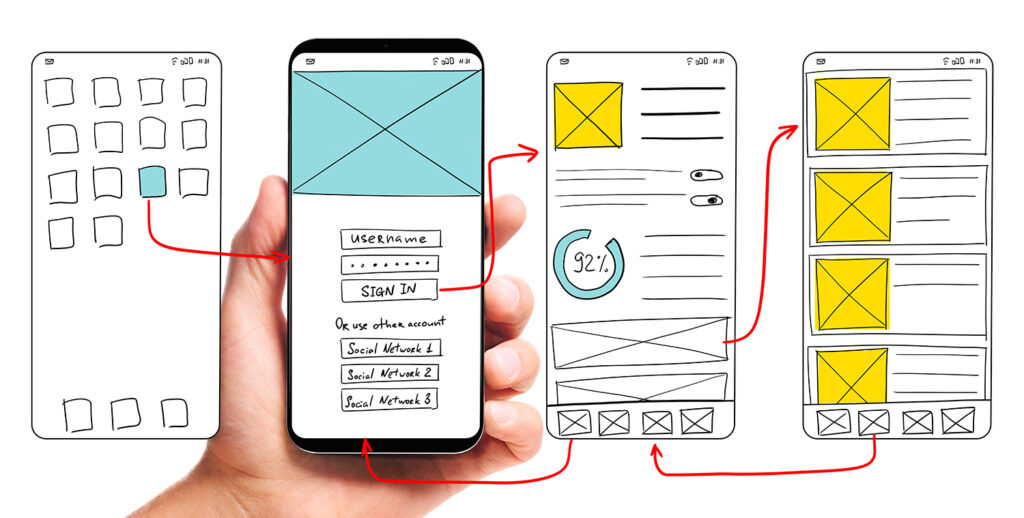
Put simply, UX means thinking about how a potential customer will engage with your idea, and UI is how it looks and feels. From product discovery, customer research, platform logic, user personas, empathy maps, prototypes, you should leave no stone unturned when planning the user experience UX for your site or platform.
When looking at web design, you should be building pages that serve a user’s search query. For example, If you have lots of people searching for “how much does a UX audit cost?” The landing page you create should include related content on this topic.
3. Responsive Design to Improve Bounce Rate
It goes without saying in this day and age that your site should be optimised for all screens and devices.
Poor mobile usability can lose visitors, while poor loading, responsiveness or visual stability can worsen the Core Web Vitals Google uses.
It’s worth noting here that a high bounce rate is not always a bad thing. When looking at it from a UX perspective, it could mean that the user has found what they are looking for without having to navigate away from the initial landing page.
To check how your site works on mobile, run it through PageSpeed Insights or Lighthouse in Chrome DevTools; both test the mobile view and show what to fix.
4. Dwell Time
Dwell time is the time between someone clicking your result in the SERP (search engine results page) and coming back to it. Don't chase it as a number: a page that sends people straight back usually isn't answering their question, and that's the real problem to fix.
From a UX point of view, the goal is content that answers the question quickly and makes the next step obvious: clear FAQs, useful interactive elements and video where it helps.
Use Google Analytics to look at engagement metrics for your organic search traffic specifically, not just the site as a whole.
5. H1 and H2 Content Headings
Headings help users and Google understand page structure; the title element can influence the search-result title, while the meta description may be used for the snippet. They are not equivalent ranking levers.
Use headings to describe each section clearly, including relevant terms naturally where they help the reader. Keep your H1 short and specific, and use H2s as genuine questions or descriptive phrases rather than padding them out for length. Do your keyword research and get creative with it!
6. Content… Content… Content!
Quality content is one of the top ranking factors search engines look at when positioning sites on the SERP.
Google’s guidance puts relevance first: where many helpful pages are available, a good page experience can contribute to success in Search.
So write content that answers the question fully and clearly; that is what Google's guidance asks for, and what keeps visitors reading.
There's no ideal word count: write as much as the question needs, and add links to useful resources and a clear next step along the way.
7. Clear and Considered Navigation
Hard navigation hurts visitors; separately, crawlable internal links and a logical site structure help search engines discover and understand pages.
The site menu should be accessible on all devices and from any page on your website. It’s worth adding a search bar for sites with a large number of pages and try to avoid more than two levels of navigation. For mobile, it’s best to incorporate a sticky menu so that a user has access to it from anywhere on the page.


8. Site Structure and Landing Pages
Use a logical, descriptive URL structure that groups related pages; do not assume visitors begin at the homepage or follow one linear route. Begin with the homepage and work on how the remaining pages fit into the user flow.
It’s also worth noting that users are unpredictable and won’t necessarily follow the flow you anticipate they will, so internal linking should be a key part of your UX SEO audit and strategy.
9. Accessibility
Accessibility is a hot topic in the technology industry, but many businesses struggle with how to approach it.
As well as being socially responsible and making sure your site is accessible and user friendly for all, accessible pages also tend to be easier for search engines to understand: clear headings, descriptive link text and image alt text help both.
Skip the overlay widgets that promise instant compliance. They tend to paper over problems rather than fix them, and several have ended up as the subject of accessibility lawsuits themselves. Real accessibility means semantic HTML, proper alt text, keyboard navigation and enough colour contrast to read comfortably, built into the page from the start.
10. Shareable on Social Media
Social shares and mentions are not direct ranking factors. Sharing can broaden reach and sometimes lead to editorial links, which may help discovery and authority.
A good way to get your content shared is by adding social media share buttons to pages and articles. Use unobtrusive share controls only when they help your audience; they are not a ranking signal and should not obstruct or slow the page.
Frequently asked questions
What are the best UX practices for SEO?
Start with mobile loading performance, interaction responsiveness and visual stability, measured by LCP, INP and CLS. Then fix navigation so visitors find what they came for. After that, write real headings, keep your site structure logical, and make sure the whole thing works for keyboard and screen reader users. If you want a second pair of eyes on where yours is losing people, that’s exactly what our UX reviews are for.
Does UX really affect SEO rankings?
Partly. Google uses Core Web Vitals in ranking, but says other page-experience aspects do not directly raise rankings. Broader UX improvements still matter for satisfaction and conversion: a slow or confusing page loses visitors even when it ranks.
Why is UX/UI important for SEO and website rank?
Because you and Google want the same thing: visitors finding an answer quickly and trusting what they find. Good UI makes your content easy to scan, good UX gets people to the right page and keeps them there, and together they’re usually why one site converts more of the same traffic than a competitor with similar rankings.
How do I optimise UX for SEO?
Run your homepage through Google’s PageSpeed Insights, which covers the mobile view, to see where you stand, then check your analytics for where people actually land, scroll and leave. Fix the biggest drop-off first rather than trying to change everything at once. If that sounds like more than you’ve got time for, our UX reviews do exactly this.
Next step
Fast pages are something Google’s ranking systems measure; clear navigation is something your visitors notice. Fix the friction and you tend to get both: better Core Web Vitals, and visitors who stay long enough to enquire.
If you’re not sure where to start, that’s what a UX review is for. We’ll look at your site the way a new visitor does and show you what’s slowing it down, what Core Web Vitals flag and where friction is costing you enquiries. We’ve been doing this work since 2005, across 350+ projects.
Design the product
Make the product easier to use before you build it.
We’ll turn the key journeys into a testable prototype, remove friction and give the build team a clear product direction.


