Google Analytics 4 vs Universal Analytics: what to review now
Universal Analytics stopped processing new hits on 1 July 2023. Compare the UA and GA4 models, then audit your current GA4 property, events, consent and reporting.

Google Analytics 4 (GA4) replaced Universal Analytics (UA). Standard UA properties stopped processing new hits on 1 July 2023, so the useful question for a UK business in 2026 is not whether to migrate. It is whether your present GA4 property measures the journeys you care about.
This guide keeps the Google Analytics 4 vs Universal Analytics comparison clear, then turns it into a practical audit checklist: streams, tags, events, key events, consent signals, ecommerce or lead tracking, retention and product links.
- UA is historical for normal properties; GA4 is the live product
- UA centred reporting on sessions and pageviews; GA4 collects event-based website and app data (sessions still exist as a derived metric)
- Review ownership, tagging, events, consent and QA before you trust the numbers

Contents
- What is Google Analytics 4?
- UA vs GA4 comparison
- Why UA ended and why GA4 matters
- What to audit in your GA4 setup now
- Historical comparison limits
- When implementation needs development work
- Our verdict
- Frequently asked questions
- References
What is Google Analytics 4?
GA4 is Google's current Analytics product for websites and apps. Collection is event-based: page views, scrolls, clicks, purchases and custom actions are recorded as events, then shaped into reports, explorations and exports.
For a website you create a GA4 property, add a web data stream, and install the Google tag (gtag.js) or load the same measurement ID through a tag manager. Google's GA4 web setup guide covers the current install paths.
If you still see an old Universal Analytics property in an account, treat it as archive context only. New behavioural data for a normal website belongs in GA4.
What is the difference between UA and GA4?
The largest practical change is the measurement model. UA organised much of its reporting around sessions and pageviews. GA4 collects an event stream for website and app activity. Sessions still appear in GA4 reporting, but they are derived from that event model rather than being the centre of how data is stored.
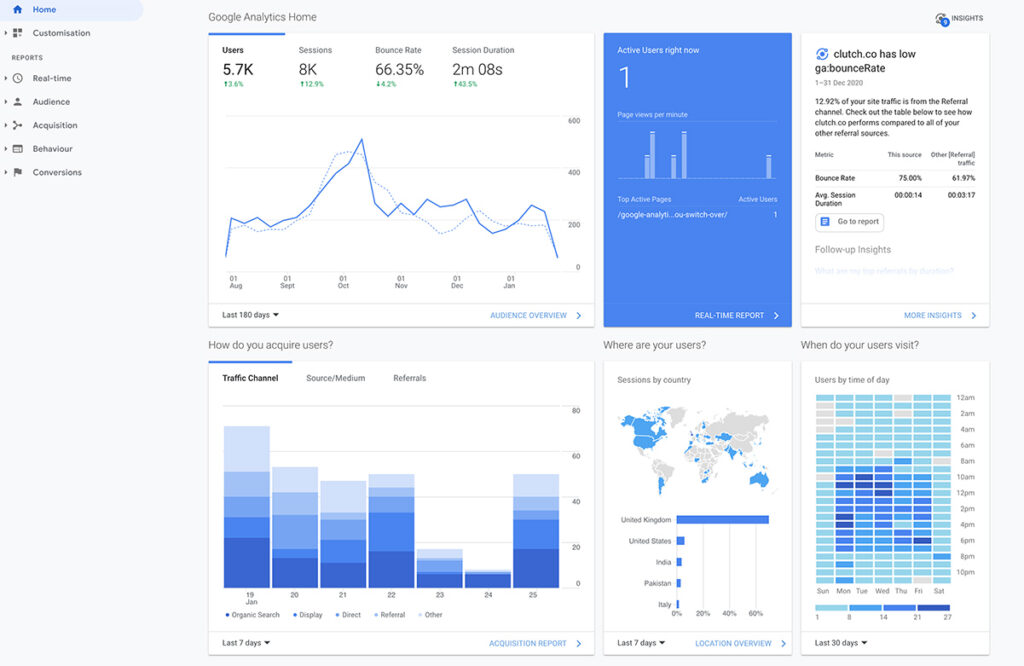
Google's UA to GA4 feature comparison is the clearest official map of what moved, what changed name, and what only exists in one product. The short version for most marketing and product teams:
| Topic | Universal Analytics | Google Analytics 4 |
|---|---|---|
| Data model | Hit types with sessions and pageviews as the main reporting frame | Event-based collection for websites and apps; sessions remain as a derived metric |
| Website and app | Website focus; apps usually needed a separate Firebase path | Web and app streams can sit in one property |
| Goals and conversions | Goals configured against UA hit patterns | Important Analytics events can be marked as key events; a Google Ads conversion can be created from an Analytics event or key event |
| Views vs controls | Reporting views with filters that could reshape what analysts saw | Property-level data controls, data filters and audiences rather than classic UA views |
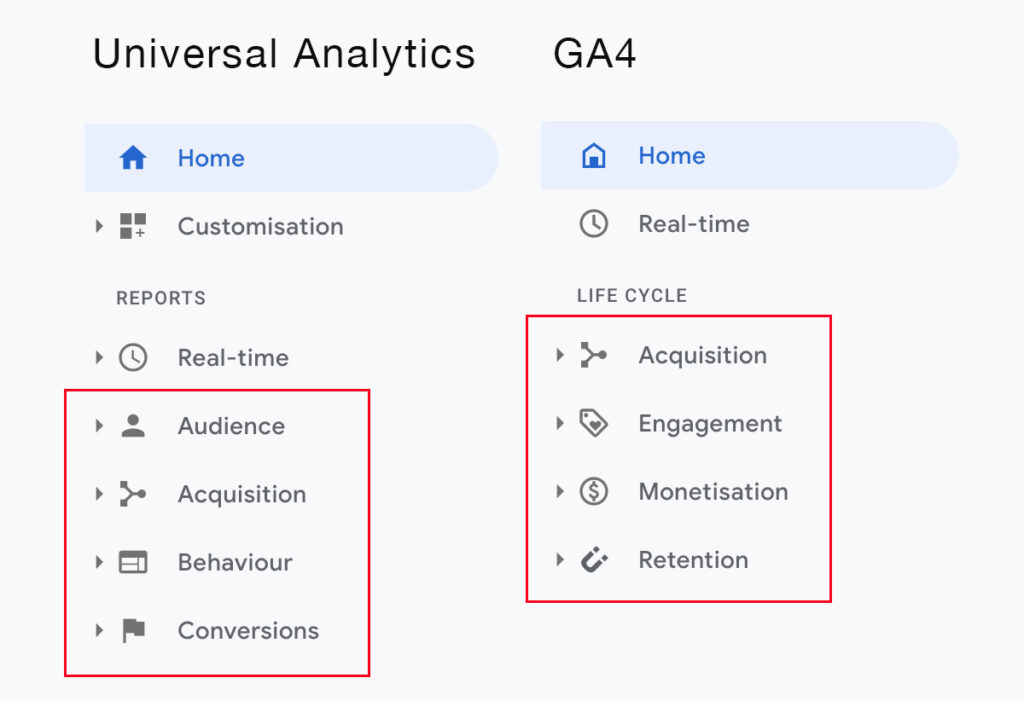
| Reporting shape | Acquisition, Audience, Behaviour, Conversions style navigation | Lifecycle-oriented reports plus Explorations for custom analysis |
| Raw-data export | Limited native raw export for ordinary properties | BigQuery export available for GA4 properties that need row-level analysis; see Google's BigQuery Export help |
Event setup also changed. GA4 mixes automatic events, enhanced measurement, recommended events and custom events. Google's GA4 events documentation and the key events guidance explain how those layers fit together.
Why UA ended and why GA4 matters
Google discontinued standard Universal Analytics processing. According to Google, standard UA properties stopped processing new hits on 1 July 2023 and GA4 is the replacement product. See Google's notice on Universal Analytics versus Google Analytics 4 and the processing cutoff.
That is why parallel "run UA and GA4 forever" advice from 2021 is obsolete. Keeping an old UA property open does not restore live collection. The work now is making GA4 trustworthy enough for product, marketing and leadership reporting.

What to audit in your GA4 setup now
Use this as a working checklist against the live property, not as a migration project plan.
- Account and property ownership. Confirm the right Google account, property name, time zone, currency and user access. Remove leavers.
- Web stream and tag firing. Check the measurement ID, stream URL, and that the Google tag or tag manager container fires on the templates that matter. Follow Google's web data-collection setup.
- Internal traffic and unwanted referrals. Define internal traffic rules for office or staging IPs. Filter known payment or auth domains from referral noise where appropriate.
- Enhanced measurement. Review which automatic interactions are enabled (page views, scrolls, outbound clicks, site search, video, file downloads) and whether they match the site's real behaviour.
- Recommended and custom events. Map the business questions first, then implement recommended event names where they fit and custom events where they do not. Keep naming consistent. See Google's event setup guide.
- Key events. Mark the conversions that leadership actually uses: purchase, lead, signup, booked demo, and so on. Re-check that each key event still fires after site releases.
- Ecommerce or lead tracking. For shops, validate item, value, tax and transaction fields. For lead-gen sites, validate form success events rather than thank-you page assumptions alone.
- Consent mode and consent signals. If you use a consent banner in the UK/EEA, set the default consent state before Google tags run, then ensure the banner sends consent updates and the intended signals. Consent mode can change tag behaviour and may send cookieless pings. Google documents the Analytics consent types and consent signal behaviour.
- Data retention and product links. Check event-data retention settings, and links to Search Console, Google Ads or BigQuery where the team relies on them.
- Realtime and DebugView testing. Trigger critical journeys yourself. Confirm events, parameters and user properties in DebugView before you call the setup done.
Historical comparison limits
GA4 does not recreate Universal Analytics history. Collection starts when the GA4 tag and events are in place. You cannot expect month-on-month continuity back through a UA archive as if both products stored the same model.
Standard Universal Analytics properties stopped processing data on 1 July 2023. Universal Analytics services and APIs were then shut down from 1 July 2024, after which ordinary UA interface and API access ended for most properties. Treat old UA exports, PDFs or BigQuery backfills you already saved as the historical record. Google's UA to GA4 migration timeline is the first-party record of that shutdown sequence.
When stakeholders ask "how do these numbers compare to 2022?", answer with method limits first: different model, different defaults, different consent reality, and often a different site. Compare trends inside GA4 after a clean start date instead of forcing a false precision match to UA.
When implementation needs development work
Many GA4 fixes are configuration. Some need engineering time on the site or app:
- Consent mode wiring that must stay aligned with your banner and regional requirements
- Cross-domain journeys, logged-in areas or multi-step checkouts that break default page attribution
- Ecommerce data layers, server-side tagging or offline conversion events
- Regression QA after template, SPA route or checkout changes
Code23 is a web and product engineering studio, not a dedicated analytics consultancy. If measurement is blocked by the website, app or release process, that is the work we can help with through websites and apps, support and growth, or a direct note via contact.
Our verdict
The UA versus GA4 debate is settled as a platform choice. GA4 is the live system. The remaining debate is quality: whether your property, events, consent path and QA process produce numbers a team can defend.
If your GA4 property was stood up quickly during the 2023 cutoff, assume drift. Re-run the audit above, fix the journeys that fund the business, and only then rebuild dashboards on top.
Frequently asked questions
Is Universal Analytics still collecting data?
Standard Universal Analytics properties stopped processing new hits on 1 July 2023. New website and app measurement belongs in GA4.
Does GA4 still have sessions?
Yes. GA4 still reports sessions, but collection is event-based and sessions are derived from that model. Do not plan reporting as if GA4 had no session metric.
Can GA4 rebuild my old UA history?
No. GA4 collects from the moment its tag and events are active. It does not retroactively recreate UA hit history for ordinary properties.
What should we do first if GA4 already exists?
Verify ownership, tag firing, key events, consent signals and DebugView results on your highest-value journeys. Configuration quality beats adding more unchecked events.
When do we need developers involved?
When consent, cross-domain behaviour, ecommerce data layers, server-side or offline events, or release QA cannot be fixed inside the Analytics UI alone.
References
- Google Developers, Set up Google Analytics on a website
- Google Developers, Set up Google Analytics events
- Google Help, Universal Analytics versus Google Analytics 4 and the 1 July 2023 cutoff
- Google Help, Google Analytics 4 has replaced Universal Analytics (migration timeline)
- Google Help, Universal Analytics to Google Analytics 4 feature comparison
- Google Help, Understand key events and conversions in Google Analytics 4
- Google Help, Set up BigQuery Export for Google Analytics 4
- Google Help, Analytics consent types
- Google Help, Consent signals in Google Analytics
Plan the next release
Build the next version around the result it needs to produce.
We’ll define the scope, design the journeys and build the systems behind them with one senior UK team.


